Higgsfield AI: what it is and what it costs
24 October 2026 · Jonas Adamsen, DSAI
Higgsfield is a US platform that puts more than 30 AI video and image models behind one login and one pool of credits. Plans start at $19 a month for 270 credits. We are DSAI, an AI company in Denmark, and we have used Higgsfield for client work since May 2026 for property films, car videos and podcast clips. Here is what it costs in practice, and what we learned by paying for it.
What is Higgsfield?
Higgsfield is an AI video and image platform run by Higgsfield Inc. in San Francisco. Instead of one subscription with Kling, one with Google and one with ByteDance, you pay in one place and pick the model for each job.
Higgsfield says the platform has more than 30 image and video models. On top of other companies' models, it has built its own tools. Cinema Studio controls camera moves and lenses, and Soul ID keeps a face consistent across images. Higgsfield says it has 25 million users and a valuation of more than $1.3 billion.
Among the models we could choose on our own account on 24 October 2026:
- Video: Seedance 2.5 and 2.0 (ByteDance), Kling 3.0 and 4.0, Veo 3.1 (Google), Wan 3.0, MiniMax, Grok and Higgsfield's own Cinema Studio.
- Images: Nano Banana 2 and Pro (Google), GPT Image, Higgsfield's own Soul and a range of specialist models for product shots and ads.
- Other: audio, voices, dubbing, upscaling and 3D models from a single image.
How much does Higgsfield cost?
Higgsfield starts at $19 a month for 270 credits. Creating an account is free, but video needs a plan. Higgsfield's pricing page showed no free plan when we checked on 24 October 2026.
| Plan | Per month | Credits |
|---|---|---|
| Starter | $19 | 270 |
| Plus | $59 | 1,200 |
| Ultra | $129 | 3,000 |
| Team, per seat | From $65 | From 1,000 |
Billed yearly, Plus is $47 and Ultra $99 a month. Starter only has selected models, and of Seedance only 2.0 Fast and Mini. Plus and up have them all.
Read from higgsfield.ai/pricing on 24 October 2026. Higgsfield changes its prices and often runs promotions, so check the page before you buy.
Which plan should you choose?
Count in clips, not credits. This is how far each plan goes at the prices our own clips cost:
| Plan | Kling 3.0 | Seedance 2.5 |
|---|---|---|
| Starter | 43 clips | Not included |
| Plus | 192 clips | 34 clips |
| Ultra | 480 clips | 85 clips |
5-second clips in 720p without sound. Higgsfield itself says about 80 Seedance 2.5 videos on Plus. With our settings each clip cost 35 credits, so we had room for 34.
- If you just want to try it, take Starter for a month. Be aware that Seedance 2.5 is not included, and that a credit costs over 40 percent more than on Plus.
- If you make video every week, take Plus. It is the smallest plan with every model.
- Count on rejects. Not every clip is usable, so the numbers in the table are a ceiling, not a promise. Below is what our finished videos cost including the rejected attempts.
What does one clip cost?
This is what our own generations cost on 23 and 24 October 2026, read from Higgsfield's transaction list:
| What | Credits | Approx. on Plus |
|---|---|---|
| One image with Nano Banana 2 | 1.5 | $0.07 |
| One image with Nano Banana Pro | 4 | $0.20 |
| 5 seconds of Kling 3.0 video, 720p, no sound | 6.25 | $0.31 |
| 5 seconds of Wan 3.0 video, 720p, no sound | 8.75 | $0.43 |
| 6 seconds of Veo 3.1 Fast video | 24 | $1.18 |
| 5 seconds of Seedance 2.5 video, 720p, no sound | 35 | $1.72 |
Dollar amounts assume the monthly Plus plan, $59 for 1,200 credits.
The real price is higher than the clip price, because not every clip is usable. A 22-second car video costs us 200 to 230 credits including the rejected attempts. A full property job in October with 19 images, 9 clips and 4 before-and-after clips used 1,372 credits.
What have we made with Higgsfield?
The films from our property jobs and car videos are made with models on Higgsfield and edited together afterwards. Three examples from real client work:
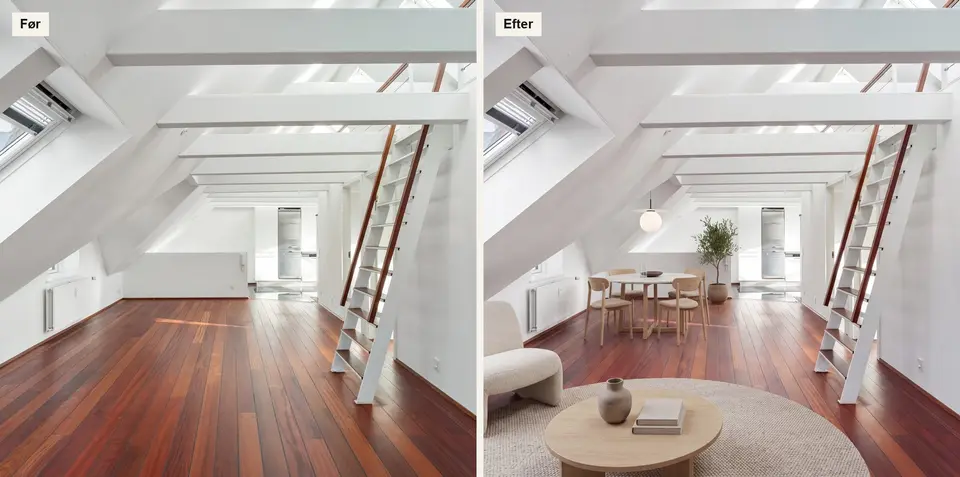
The full stories are in our case studies (in Danish) on furnished property films, the house on the plot and car videos from stock.
The traps we paid for ourselves
Higgsfield delivers good quality, but the business model is pushy. On Trustpilot it holds 4.0 out of 5 from more than 4,500 reviews, and 19 percent give one star. The complaints are almost never about the pictures. They are about money.
- Credits do not roll over. Unused credits disappear when the period ends, and top-up credits expire after 90 days.
- Plans renew automatically. That goes for monthly and annual plans. Higgsfield has to send a reminder before an annual plan renews, but set your own reminder a week before.
- Presets can hijack your job. When we asked for an empty, bright living room, Higgsfield suggested the preset "IN THE DARK" instead of starting the job. Decline the suggestion, or nothing happens.
- Model names change meaning. In September the model nano_banana_2 meant the Pro version. On 24 October the same name was billed as Nano Banana 2 at 1.5 credits. Check the transaction list, not the name.
- Brand and celebrity names are risky. They can get the job rejected, and those credits do not come back.
- Higgsfield's own upscaler alters the picture. We upscale stills with Nano Banana Pro in 4K and a prompt that asks for no changes at all.
- Your files can be used for training. The terms say so, and data is stored in the US. On the regular plans the only way to stop it is to delete your content or your account. Only business customers with an Enterprise agreement are exempt. We never send client photos with people in them without an agreement.
How to cancel Higgsfield, and when you get your money back
Cancelling and getting a refund are two different things at Higgsfield. Cancelling stops future charges, but you get nothing back for the period you are in, unless you are still within the first 7 days (see step 3).
- Cancel. Log in at higgsfield.ai and go to Payment Settings in your account. You can also email support@higgsfield.ai, but the email has to come from the address on the account.
- Use the rest of the period. The plan runs to the end of the period and does not renew. Your files and your account are not deleted.
- Ask for a refund if you qualify. You can only get one within 7 days of your first purchase, and only if you have not used any credits. Logging in and looking around does not count as use. Renewals are not refunded, and Higgsfield may keep up to 6 percent as a fee. Send the request through higgsfield.ai/contact with the account email, the purchase date and the amount.
If you are a consumer in the EU or UK, you have a 14-day right of withdrawal from the day you bought. Write to support@higgsfield.ai. It does not cover what you have already used, so you pay for any credits you have spent.
Top-up credits can only be refunded within 7 days and only if none of them have been used.
Source: Higgsfield's terms of use, sections 9.3, 9.6, 10.3, 10.4 and 17.2, read on 24 October 2026.
Higgsfield, or straight to Kling, Google and Runway?
Higgsfield is the right choice when you want to switch models depending on the job. Going straight to one provider gets you one model, usually with its newest features first.
The price gap is smaller than you might think. A 2026 comparison by aireiter.com found the same clip can be up to 20 percent cheaper on Higgsfield or up to 36 percent more expensive, depending on the model and the credits. Runway and Midjourney were not in Higgsfield's model catalogue when we checked on 24 October 2026, so if you use them you still need their own plans.
We use Higgsfield because our jobs need different models. Empty rooms go to Seedance, cars to Kling, and houses in drone footage to Gemini Omni. With four subscriptions we would spend more time on admin than on films. To see which model wins at what, we ran the same image through four models.
Who is Higgsfield for?
Higgsfield suits you if you make video or images every week and want to try several models. For one video a year, that is overkill, and buying a finished video costs less.
If you make the same thing again and again, such as a video for every new car in stock or every new property for sale, it can be automated. Higgsfield is then connected to your stock or listings system through the MCP or the new API, and the clip gets made without anyone sitting there writing prompts.
Common questions
Is Higgsfield free?
Creating an account is free, but video needs a paid plan. Higgsfield's pricing page showed no free plan on 24 October 2026. The cheapest, Starter, is $19 a month for 270 credits.
What does one AI video cost on Higgsfield?
It depends on the model. In our test on 24 October 2026, five seconds of 720p video without sound cost between 6.25 credits with Kling 3.0 and 35 credits with Seedance 2.5. An image with Nano Banana 2 cost 1.5 credits.
Is Higgsfield legit?
Yes. It is a real company with millions of users and a 4.0 out of 5 rating on Trustpilot from more than 4,500 reviews (September 2026). The complaints are almost always about subscriptions, credits and refunds, not output quality.
Why does Higgsfield Inc appear on my card statement?
It is the company name behind higgsfield.ai, based in San Francisco. If you do not recognise the charge, log in at higgsfield.ai and check your plan under Payment Settings. Annual plans renew automatically.
How do I cancel Higgsfield?
Log in at higgsfield.ai and cancel under Payment Settings, or email support@higgsfield.ai from the address on the account. The plan runs to the end of the period, and the rest of the period is not refunded.
Can I get a refund from Higgsfield?
Only within 7 days of your first purchase, and only if you have not used any credits. Renewals are not refunded, and Higgsfield may keep up to 6 percent as a fee. Consumers in the EU and UK have a 14-day right of withdrawal, but it does not cover what you have already used.