Higgsfield MCP and API: how to make AI video straight from Claude
24 October 2026 · Jonas Adamsen, DSAI
Higgsfield MCP is an official MCP server at https://mcp.higgsfield.ai/mcp. It lets Claude, ChatGPT and other AI assistants make images and video with Higgsfield's models inside the conversation. You sign in with your Higgsfield account, there is no API key, and every generation uses the same credits as the website. Higgsfield also has an API with its own keys and its own dollar balance. Every clip in our model test was made through the MCP from Claude Code on 24 October 2026, and this page shows exactly how.
What is Higgsfield MCP?
Higgsfield MCP is a connector that lets an AI assistant use Higgsfield for you. You say what you want, and Claude picks the model, sends the job, waits for the result and shows it to you in the conversation.
MCP stands for Model Context Protocol, the shared standard that Claude, ChatGPT and others use to talk to other systems. Anthropic launched it in November 2024, and it now sits with the Linux Foundation.
How to connect Higgsfield MCP to Claude
It takes a couple of minutes and no code, just a Higgsfield account.
- Open Claude, go to Settings, Connectors, and choose Add custom connector.
- Name it Higgsfield and paste the URL
https://mcp.higgsfield.ai/mcp. - Click Connect and sign in with your Higgsfield account.
- Switch the connector on in the conversation where you want it, under the plus button and Connectors.
If you use Claude Code in the terminal, as we do, it is one command. Then sign in with /mcp:
claude mcp add --transport http higgsfield https://mcp.higgsfield.ai/mcpFor ChatGPT, Higgsfield has a button on higgsfield.ai/mcp that adds the app. We have not tested that one ourselves.
What do you type? Five prompts to start with
You write to Claude the way you would write to a colleague, and Claude turns it into the right calls. Copy one of these and adjust it:
What does a 5-second clip cost with Seedance 2.5 and with Kling 3.0
in 720p without sound? Do not start anything yet.
Make an image with Nano Banana 2 in 16:9 of an empty, bright living
room in a Copenhagen flat with herringbone parquet. No furniture, no people.Use that image as the start frame and make a 5-second clip with
Kling 3.0 where the camera glides slowly toward the door. The room
must not change, and nothing new may appear.Here is a photo of our product. Upload it to Higgsfield and make
four 1:1 variants with different backgrounds. Do not change the product.How many credits do I have left, and what did my last ten
generations cost?When it does not work
- Claude cannot see Higgsfield. The connector has to be switched on in each conversation, under the plus button and Connectors. In Claude Code, type
/mcpand check that Higgsfield shows as connected. - Claude asks you to sign in again. The login expires now and then. Run
/mcpin Claude Code, or click Connect again under Connectors in Claude. - The job does not start, and a suggestion comes back instead. Higgsfield has suggested a preset. Ask Claude to decline it and send the job again.
- The image is ignored. A link to an image on the web does not work. Attach the file in the conversation, and Claude uploads it to Higgsfield first.
- The job is rejected. Brand names, celebrities and anything that looks like nudity are stopped by the filter. Remove the name from the prompt and try again.
Is Higgsfield MCP free or paid?
The connection itself is free, but every image and video draws credits from your Higgsfield account, exactly like the website. In practice you need a plan, and the cheapest is $19 a month. Our Higgsfield pricing page shows what a clip costs and how far each plan goes.
One thing to know before you automate. Plus and Ultra include models with unlimited use, but the terms say unlimited is for human use only. Run scripts against it, and Higgsfield may pause your access. Plan on credits for anything that runs by itself.
MCP, CLI or API: which one should you use?
Higgsfield has three ways in. They look alike, but each is built for a different situation.
| MCP | CLI | API | |
|---|---|---|---|
| For | A conversation with Claude or ChatGPT | Scripts in the terminal on your own machine | Software on a server that runs by itself |
| Sign-in | Your Higgsfield account | Your Higgsfield account (higgsfield auth login) | API key from console.higgsfield.ai |
| Billing | Your plan credits | Your plan credits | A separate dollar balance that expires after one year |
| Models | The full catalogue, including Nano Banana, GPT Image and Veo | The full catalogue | 84 variants: Seedance, Kling, Wan, MiniMax, Grok and Higgsfield's own. No Nano Banana, GPT Image or Veo |
| We use it for | New tasks, tests and one-off jobs | Fixed recipes, such as our property films | Not in production yet |
MCP is for finding out what works. The CLI repeats it. The API runs it without you.
Getting started with the Higgsfield CLI
The CLI is a terminal program. It needs Node.js and signs in with the same account as the website:
npm install -g @higgsfield/cli
higgsfield auth login
higgsfield account status
The last line shows your plan and balance, so you know the login worked. If you are on a team, pick which workspace pays with higgsfield workspace set. Otherwise jobs go on your private account.
Ask for the price before you send a job, and wait for the result in the same command:
higgsfield generate cost kling3_0 --prompt "Slow dolly toward the door" --start-image ./room.jpg
higgsfield generate create kling3_0 --prompt "Slow dolly toward the door" --start-image ./room.jpg --wait
Local files are uploaded automatically. higgsfield model list --video lists the video models you can pick, and higgsfield account transactions shows what each job cost.
Higgsfield API: what you need to know
Higgsfield relaunched its API in September 2026. It is a standard REST API: you send a job, get a request_id back, and either poll for the status or get a webhook when it is done.
- Its own dollar balance. The API does not share credits with your plan. You add funds at console.higgsfield.ai, and they expire a year after you add them.
- Price before you call. An estimate call tells you what a job costs in dollars before you send it. Use it, because prices depend on the model and the settings.
- Failures are free. Jobs that fail or get stopped by the content filter are not charged.
- Files are deleted after seven days. Copy results to your own storage straight away.
- Training is on by default. Your outputs can be used to train Higgsfield's models until you switch it off under Settings in the console.
- SDKs for Python and TypeScript.
pip install higgsfield-clientornpm install @higgsfield/client.
The smallest example in Python, taken from Higgsfield's own documentation:
import higgsfield_client   # the key lives in HF_KEY="id:secret"

result = higgsfield_client.subscribe(
    "higgsfield-ai/soul/v2/standard",
    arguments={"prompt": "Editorial portrait in soft daylight"},
)
print(result["images"][0]["url"])
When does the API make sense for a business? When the same thing should happen every time something happens in another system. A new car arrives in stock, and by morning there is a video ready. A new property goes on sale, and the agent has a film the next day. Someone has to connect your stock or listings system to Higgsfield. That is what we do.
A real example: how the test on our site was made
Every clip on our page about the best AI video generator was made through Higgsfield MCP from Claude Code on 24 October 2026. None of them were made in Higgsfield's browser app.
First we asked for two start frames, an empty living room and a car with no badge. Claude sent both to Nano Banana 2 in one call. The images cost 1.5 credits each:
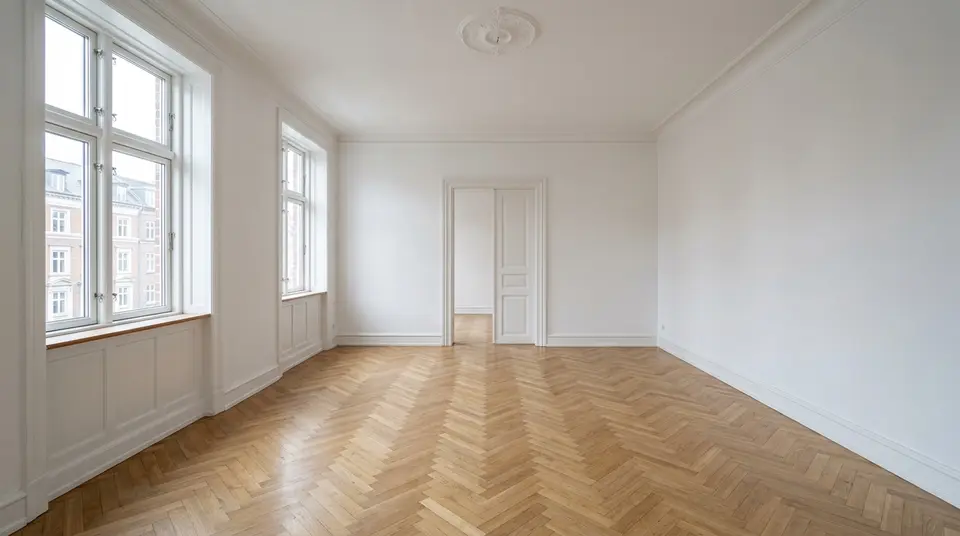

Then Claude sent eight video jobs at once: four models times two images. One of the jobs looked like this:
{
  "model": "kling3_0",
  "duration": 5,
  "sound": "off",
  "medias": [{ "role": "start_image", "value": "<job id of the room image>" }],
  "prompt": "The camera glides forward on a motorised dolly toward the open
             doorway in the back wall, ending 15 percent closer. One constant
             speed, locked level horizon. The empty room stays exactly as it is
             ... Nothing new appears in the room, no people, no furniture."
}
Four of the eight jobs did not start. Higgsfield answered by suggesting the preset "IN THE DARK" instead. Claude sent the four jobs again with the suggestion declined, and they ran. A few minutes later all eight clips were ready, and the whole test had cost 151 credits.
Six things we learned about Higgsfield in Claude
- Ask for the price first. The MCP can work out the cost without starting the job. Have Claude do it before you send twenty clips.
- Decline presets. Higgsfield sometimes suggests a preset instead of running your job. Say no, or nothing happens.
- Check which model you got. We asked for nano_banana_2 and got Nano Banana 2, not Pro, although the name meant Pro in September. Trust the transaction list.
- Send files, not links. Images and video have to be uploaded to Higgsfield first. A link to a file on the web is not read as an image.
- Batch your jobs. Eight clips in one batch run side by side. Eight one at a time take longer and clutter the conversation.
- Do not let the AI grade itself. We had Gemini review the eight clips. It gave seven of them 9 or 10 out of 10 and missed both an extra door leaf and a new pipe in the ceiling. Look at the first and last frame yourself.
Common questions
Is Higgsfield MCP free or paid?
Connecting the MCP server is free, but every generation draws credits from your Higgsfield account, exactly like the website. In practice you need a plan, and the cheapest is $19 a month.
What is the Higgsfield MCP server URL?
https://mcp.higgsfield.ai/mcp. Add it as a custom connector in Claude and sign in with your Higgsfield account.
Does Higgsfield MCP work in ChatGPT?
Yes. Higgsfield has a ChatGPT button on higgsfield.ai/mcp. We have only used it in Claude and Claude Code ourselves.
What is the difference between Higgsfield MCP and the API?
The MCP uses your normal account and credits and is built for use in a chat. The API has its own keys, a separate dollar balance and webhooks, and is built for software that runs without a person at the keyboard.
Does the Higgsfield API include Nano Banana and Veo?
No, not as of 24 October 2026. The API catalogue lists 84 model variants, including Seedance, Kling, Wan and Higgsfield's own. Nano Banana, GPT Image and Veo are only available on the platform and through the MCP.